
- Recommendations
- Why Shadow Processes Survive Despite Millions in Automation Investments
- What Is a Shadow Process?
- Why Spreadsheets Refuse to Die
- Why Automation Projects Still Leave Gaps
- The Hidden Risks of Spreadsheet-Run Operations
- How to Fix It Without Declaring War on Excel
- The Bigger Lesson for Digital Transformation
- Final Thought
Recommendations
- Identify any spreadsheet that directly influences revenue, finance, inventory, customer operations, or compliance and determine whether it has quietly become a system of record.
- During process reviews, actively ask employees what tools they use outside official systems rather than assuming approved platforms represent the entire workflow.
- Review spreadsheets created during operational disruptions and identify which workflow requirements your enterprise systems still fail to support effectively.
- Map workflows based on observed employee behavior rather than documented process diagrams alone.
- Classify spreadsheets according to business criticality and prioritize governance reviews for any file that directly supports financial, operational, forecasting, or compliance decisions.
- Focus remediation efforts on spreadsheets acting as systems of record while preserving appropriate flexibility for analysis and planning activities.
- Treat shadow processes as operational intelligence and investigate the business problem they solve before attempting to eliminate them.
Why Shadow Processes Survive Despite Millions in Automation Investments
Your company invested in ERP systems. It rolled out workflow tools. It bought dashboards, integrations, and automation platforms. Leadership talks about digital transformation in every quarterly meeting.
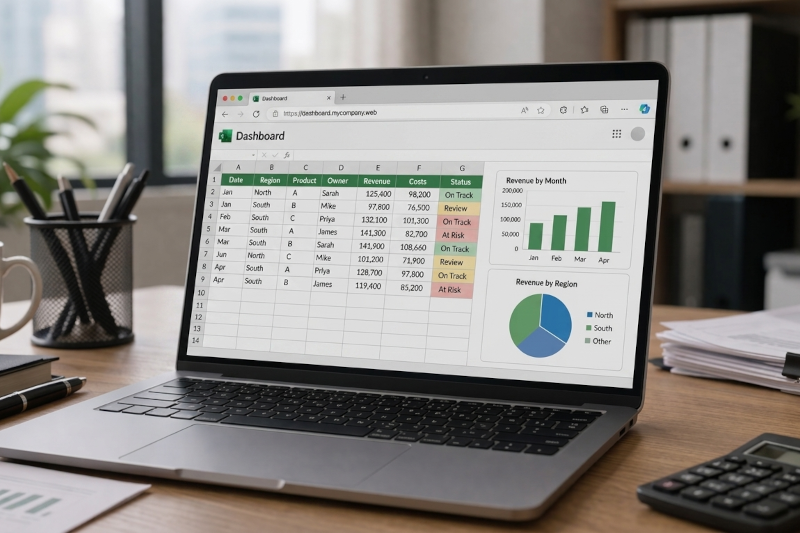
And yet, somewhere inside the business, a spreadsheet still runs a mission-critical process.
Maybe it approves vendor payments. Maybe it tracks customer renewals. Maybe it controls inventory reorder points. Maybe payroll depends on it every Friday morning.
According to WIPFLI, this is one of the most common—and least discussed—realities of modern operations: shadow processes. These are unofficial workflows that survive outside enterprise systems, often in spreadsheets, email chains, or manual trackers. They persist not because employees love spreadsheets, but because the official systems failed to fully solve the real work.
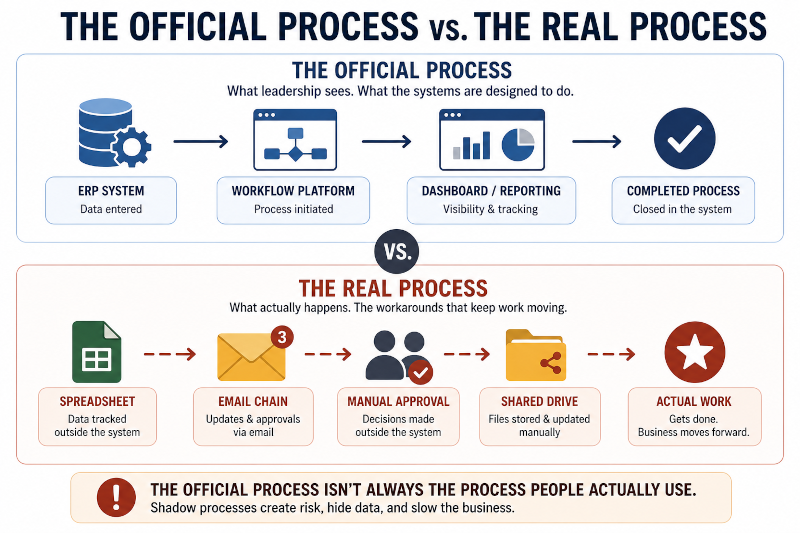
For leaders pursuing efficiency, this matters. Because the spreadsheet is rarely the real problem. It is a symptom of a deeper operational gap.
Recommendation: Identify any spreadsheet that directly influences revenue, finance, inventory, customer operations, or compliance and determine whether it has quietly become a system of record.
What Is a Shadow Process?
A shadow process is any business-critical workflow operating outside approved or governed systems.
Examples include:
- Finance closing books with offline reconciliations.
- Sales forecasting in side spreadsheets instead of CRM.
- HR onboarding tracked through shared files.
- Procurement approvals managed through email.
- Operations scheduling in manually updated worksheets.
These processes usually emerge for a simple reason: employees need to get work done. When official systems become too slow, too rigid, or too disconnected from operational reality, teams create their own mechanisms for keeping work moving. Gartner has long warned that shadow IT and unsanctioned tools introduce hidden operational, financial, and governance risks.
A useful way to think about shadow processes is this:
When the system does not fit the work, the work finds another system.
The spreadsheet is not a rejection of technology. It is often an adaptation to limitations within the technology already in place.
Recommendation: During process reviews, actively ask employees what tools they use outside official systems rather than assuming approved platforms represent the entire workflow.
Why Spreadsheets Refuse to Die
Spreadsheets remain deeply embedded in business because they solve real problems immediately.
They are:
- familiar,
- flexible,
- easy to modify,
- inexpensive,
- and controlled by the people doing the work.
Academic research continues to show that spreadsheets remain among the most widely used tools for analysis, planning, modeling, and decision support across organizations. Their longevity comes from accessibility and speed rather than technical sophistication.
That distinction matters.
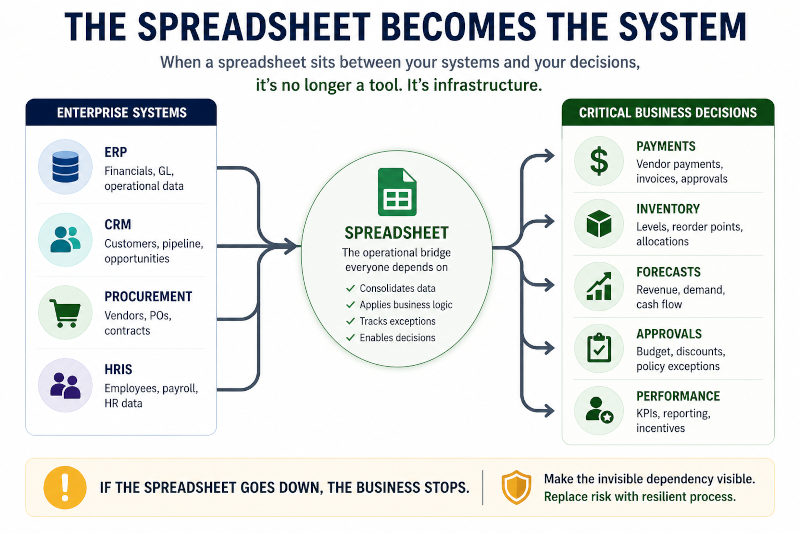
Many transformation initiatives assume spreadsheets survive because employees resist change. In reality, employees often adopt spreadsheets because the alternative creates more friction than value. Replacing a spreadsheet is rarely about replacing software. It is about replacing convenience, autonomy, adaptability, and speed.
The COVID-era supply chain disruptions provide a useful example. Many organizations discovered that their ERP platforms could not adapt quickly enough to rapidly changing inventory conditions, supplier shortages, and demand fluctuations. Teams responded by creating spreadsheet-based trackers to manage inventory allocations, monitor supplier updates, and coordinate fulfillment decisions. These workarounds often emerged in days, while formal ERP modifications would have required weeks or months.
The lesson was revealing. Employees were not rejecting enterprise systems. They were compensating for the inability of those systems to respond quickly enough to operational reality.
The spreadsheet survived because it solved a problem.
Recommendation: Review spreadsheets created during operational disruptions and identify which workflow requirements your enterprise systems still fail to support effectively.
Why Automation Projects Still Leave Gaps
Many automation initiatives fail to eliminate shadow processes because they focus on systems rather than workflow reality.
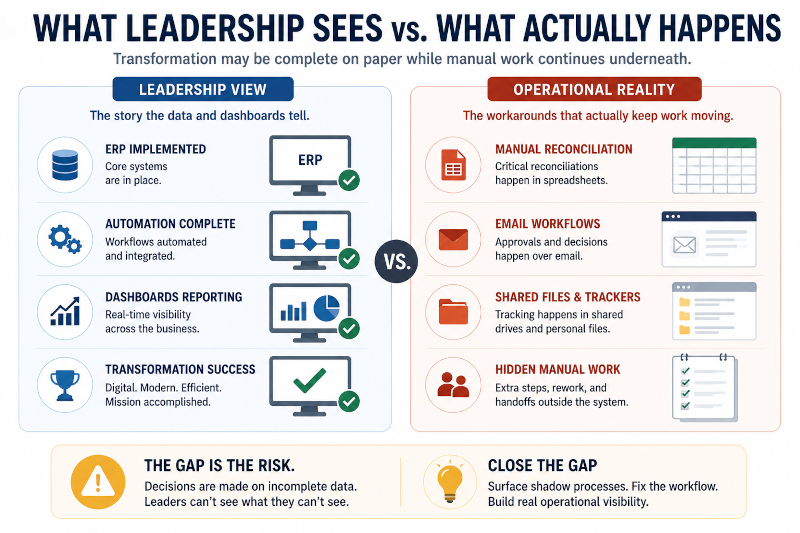
One common issue is incomplete process discovery. Organizations often automate what leadership believes happens instead of what employees actually do. The official workflow diagram may contain five steps, while the real process includes twelve workarounds, multiple side approvals, and several manually maintained files that never appeared during discovery sessions. If those realities are not captured, automation simply formalizes an incomplete version of work.
Another challenge involves standardization. Enterprise platforms are designed to create consistency, but real operations rarely behave consistently. Rush orders, customer-specific requirements, missing information, temporary policy changes, and exception handling occur constantly. When systems cannot accommodate those realities efficiently, teams create side processes to bridge the gap.
Speed also plays a role. Business teams often need solutions immediately, while enhancement requests may sit in development queues for months. What begins as a temporary spreadsheet can quickly become permanent operational infrastructure.
Ownership fragmentation creates another common problem. Sales owns demand. Finance owns budgets. Operations owns fulfillment. Procurement owns vendors. Yet many workflows cross all of those functions simultaneously. When no single group owns the end-to-end process, nobody fully owns fixing it. The spreadsheet becomes the shared bridge connecting disconnected responsibilities.
The uncomfortable reality is that many automation programs improve official workflows while the real work continues happening somewhere else.
Recommendation: Map workflows based on observed employee behavior rather than documented process diagrams alone.
The Hidden Risks of Spreadsheet-Run Operations
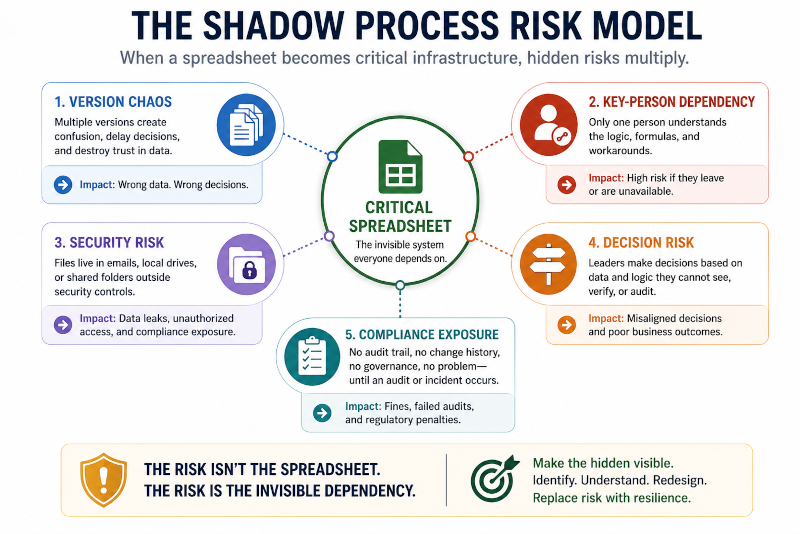
Spreadsheets can be valuable tools. But when they evolve into critical operational infrastructure, risk accumulates quickly.
Version control becomes difficult. Many organizations have encountered folders containing files named:
- Final.xlsx
- Final_v2.xlsx
- Final_Final.xlsx
- Final_UseThisOne.xlsx
Multiple versions create uncertainty, undermine trust in data, and slow decision-making.
Key-person dependency presents another major risk. Often only one employee understands the formulas, macros, business logic, or manual procedures embedded within a critical spreadsheet. If that individual leaves, retires, or changes roles, the organization inherits a process that nobody fully understands or can maintain.
Spreadsheet governance research has repeatedly highlighted this dependence on informal creators rather than sustainable organizational controls.
Errors represent another serious concern. Small formula mistakes, hidden rows, broken references, or manual data-entry issues can propagate throughout business processes and affect forecasting, billing, inventory planning, and financial reporting.
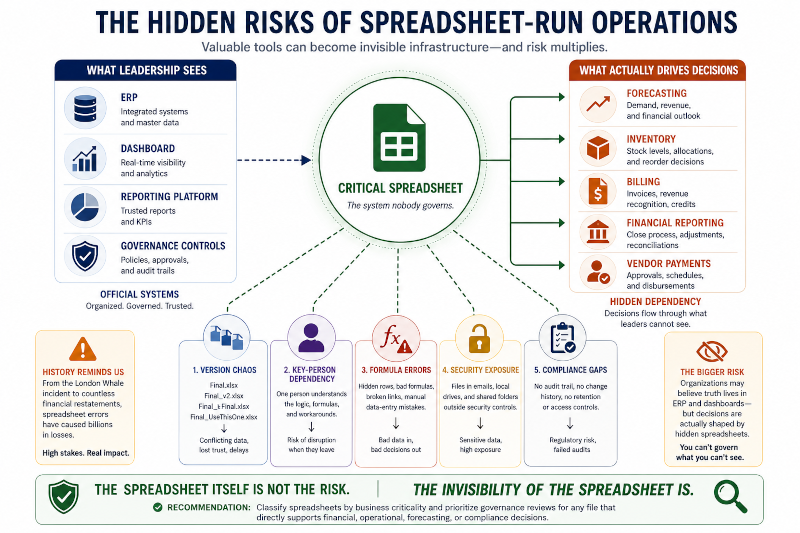
History provides a powerful example. During JPMorgan’s London Whale incident, spreadsheet-related errors contributed to inaccurate risk calculations and reporting processes associated with trading activities that ultimately resulted in billions of dollars in losses. The spreadsheets were not the sole cause of the problem, but the incident demonstrated how operationally critical decisions can become dependent on tools never designed to function as enterprise-scale control systems.
There is also a broader strategic risk that organizations often overlook.
Leadership may believe operational truth resides within ERP systems, analytics platforms, or approved reporting environments. Meanwhile, critical decisions are actually being influenced by spreadsheets that exist outside governance visibility. In those situations, the organization may be managing official systems while depending on unofficial ones.
Security and compliance concerns add another layer of exposure. Sensitive information stored in local files, emailed attachments, or unmanaged shared drives can bypass retention policies, audit trails, access controls, and governance requirements.
The spreadsheet itself is not necessarily dangerous.
The invisibility of the spreadsheet often is.
Recommendation: Classify spreadsheets according to business criticality and prioritize governance reviews for any file that directly supports financial, operational, forecasting, or compliance decisions.
How to Fix It Without Declaring War on Excel
Organizations that attempt to ban spreadsheets usually fail.
A more effective strategy begins by identifying where spreadsheets have quietly become systems of record.
Start by asking simple questions:
- What process stops if this spreadsheet disappears?
- Who maintains it?
- Who approves through it?
- What decisions depend on it?
Inventory comes first.
Once critical spreadsheets are identified, focus on understanding the job they perform. Rather than asking how to eliminate a spreadsheet, ask what problem it solves better than the approved systems. The answer often reveals the underlying workflow gap that created the shadow process in the first place.
From there, attention should shift toward workflow redesign. Replacing a spreadsheet with another interface rarely solves the root problem if approval structures, ownership models, exception handling, and process handoffs remain unchanged.
“The goal is not to eliminate spreadsheets. The goal is to understand why the business still depends on them.”
At the same time, organizations should avoid treating every spreadsheet as a problem. Spreadsheets remain highly effective for analysis, modeling, experimentation, and temporary planning activities. The goal is not elimination. The goal is ensuring they do not become unmanaged operational infrastructure.
Recommendation: Focus remediation efforts on spreadsheets acting as systems of record while preserving appropriate flexibility for analysis and planning activities.
The Bigger Lesson for Digital Transformation
If a spreadsheet still runs part of the business, it does not necessarily mean employees are resisting transformation.
More often, it means employees adapted faster than the transformation program did.
That distinction is important.
The people using shadow processes are often closest to the operational friction that leadership cannot see. Their workarounds may appear messy, but they frequently contain valuable information about where systems, workflows, ownership structures, or governance models have failed to support actual work.
Finance organizations provide a useful example. Many companies have invested heavily in ERP platforms, analytics environments, and financial management systems, yet month-end close processes frequently continue relying on offline reconciliation spreadsheets maintained by individual teams. The ERP contains the official data, but the spreadsheets contain the practical logic needed to reconcile exceptions, resolve discrepancies, and move work forward.
This reveals a broader truth about transformation efforts.
Technology implementation does not automatically eliminate operational friction.
The spreadsheet often survives because the friction survives.
A more contrarian perspective is that shadow processes may be the most honest documentation of how work actually happens. Official process maps describe intended workflows. Shadow processes reveal where employees encounter obstacles, create workarounds, and adapt to operational reality.
Smart leaders do not ignore those signals.
They investigate them.
Because every shadow process contains information about a gap the organization has not yet addressed.
Recommendation: Treat shadow processes as operational intelligence and investigate the business problem they solve before attempting to eliminate them.
Final Thought
The most dangerous spreadsheet in your organization is rarely the one with ugly formatting.
It is the one everyone depends on but nobody talks about.
When unofficial tools become critical infrastructure, organizations can appear highly automated on paper while still depending on hidden manual logic behind the scenes. Dashboards may be modern. Systems may be integrated. Transformation programs may be celebrated.
Yet a spreadsheet remains responsible for keeping essential work moving.
The spreadsheet is not the failure.
It is evidence of a failure somewhere else.
Until organizations understand why shadow processes emerged in the first place, digital transformation remains incomplete. The goal is not to eliminate every spreadsheet. The goal is to identify where unofficial workflows have become substitutes for missing operational capability.
Because the spreadsheet that still runs the business is often telling you something your systems are not.
2 thoughts on “The Spreadsheet That Still Runs the Business”