Recommendations
- Review the percentage of tickets classified as High or Critical over the past year before investing in additional workflow automation.
- Define priority levels in business terms and require leadership approval for tickets classified as Critical.
- Measure changes in ticket volume, escalation rates, and priority distributions after implementing automation—not just improvements in processing time.
- Measure how many escalated tickets ultimately require immediate action and use that data to recalibrate priority definitions.
- Conduct quarterly reviews of Critical tickets to ensure they align with actual business impact rather than perceived urgency.
- Include priority distribution metrics in executive dashboards and review them quarterly alongside service levels, employee satisfaction, and broader operational performance indicators.
Organizations rarely invest in ticketing platforms because they enjoy managing queues and service requests. They invest because work has become difficult to see.
As companies grow, the number of requests, exceptions, dependencies, and interruptions grows with them. Ticketing systems promise order. Add automation to the equation, and the promise becomes even more compelling: requests are routed automatically, workflows move faster, response times improve, and leadership gains visibility into where time is being spent.
At least, that is the expectation.
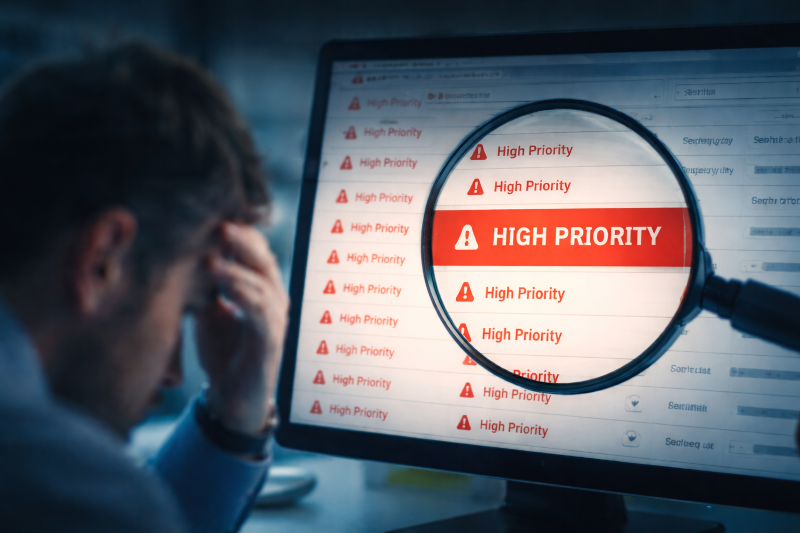
Yet many organizations discover that several months after implementing workflow automation, the service desk feels no less overwhelmed than it did before. Employees still complain that nothing gets done. Teams remain buried in work. The backlog continues to expand. And somewhere in the quarterly operational review, someone inevitably notices that an uncomfortable percentage of tickets are now categorized as “High Priority.”
The technology is functioning exactly as designed. The organization, however, may not be.
Automation has a way of exposing realities that manual processes can conceal. It does not create discipline, establish governance, or resolve disagreements about urgency. It simply accelerates existing behaviors and records them with greater precision.
That is why conversations about ticketing are rarely about ticketing for very long. They quickly become conversations about decision-making, accountability, and how an organization determines what deserves attention.
In many respects, a ticketing platform functions less like a productivity tool and more like a mirror. And occasionally, organizations discover they do not particularly like what it reflects.
The Promise of Ticket Automation
The business case for ticket automation remains compelling.
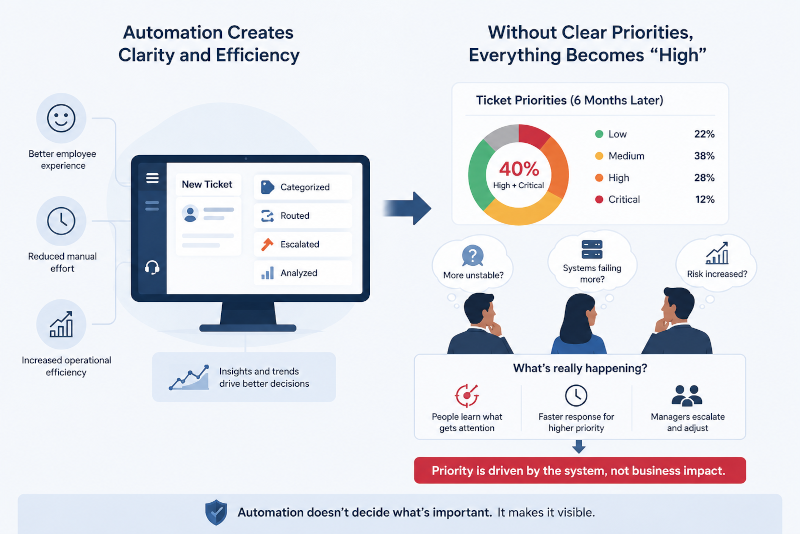
Organizations continue to invest heavily in AI-enabled service management capabilities to improve employee experience, reduce manual effort, and increase operational efficiency.
Modern platforms have become remarkably sophisticated. Requests can be categorized automatically, routed to the appropriate teams, escalated based on predefined conditions, and analyzed for trends that would have been nearly impossible to identify a decade ago.
These capabilities matter. Few leaders would argue for a return to shared inboxes, spreadsheets, or undocumented requests passed between departments.
The difficulty arises when organizations assume that better tooling will naturally lead to better prioritization.
Consider a relatively common scenario. A company introduces a new ticketing platform and defines four priority levels: Low, Medium, High, and Critical. Six months later, leadership reviews the data and finds that nearly 40% of all tickets fall into the top two categories.
The immediate reaction is usually one of surprise.
Has the business suddenly become more unstable? Are systems failing more frequently? Has risk increased?
In most cases, the answer is considerably simpler. Employees have learned which buttons receive attention.
Over time, organizations develop informal rules that exist independently of documented processes. If selecting “Medium” results in a five-day wait while selecting “High” receives a same-day response, people adjust accordingly. Managers escalate requests because they are accountable for outcomes. Employees classify inconveniences as urgent because they have experienced what happens when they do not.
Eventually, priority becomes less about business impact and more about navigating the system.
Automation did not create that behavior. It merely made it measurable.
This dynamic builds directly on ideas explored in How High-Performing Organizations Reduce Operational Friction, where operational challenges are often rooted in unclear ownership and competing priorities rather than deficiencies in technology.
Recommendation: Review the percentage of tickets classified as High or Critical over the past year before investing in additional workflow automation.
Priority Is a Business Decision
One of the more subtle mistakes organizations make is treating priority as a user preference.
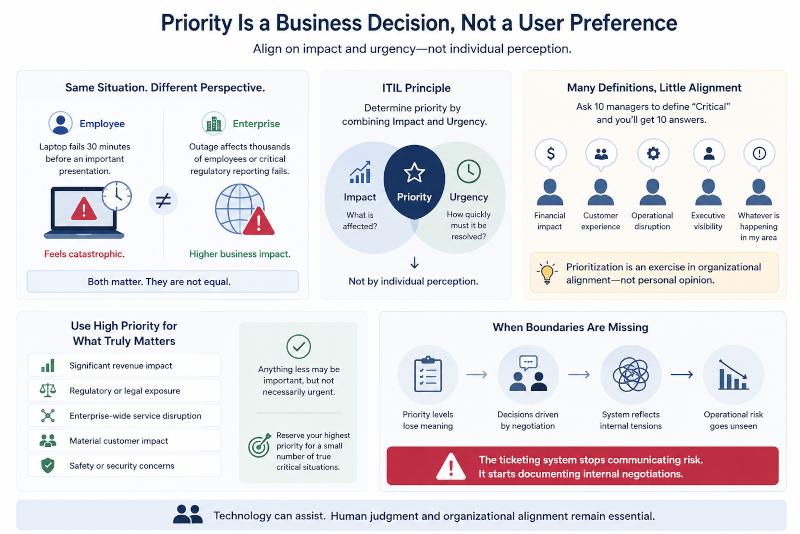
From an employee’s perspective, a laptop failure thirty minutes before an important presentation may feel catastrophic. From the perspective of the enterprise, however, an outage affecting thousands of employees or a regulatory reporting failure occupies an entirely different category.
Both situations matter. They are simply not equal.
This distinction is why ITIL has long recommended determining priority through a combination of impact and urgency rather than individual perception.
Despite broad acceptance of this principle, many organizations struggle to apply it consistently.
Ask ten managers to define a “Critical” incident and you are likely to receive ten different answers. Some will focus on financial impact. Others will emphasize customer experience, operational disruption, or executive visibility. A few may define criticality according to whichever issue happens to be affecting their team at that moment.
None of this is unusual.
Prioritization is fundamentally an exercise in organizational alignment. It forces leadership teams to answer difficult questions about what the business values and what level of disruption it is willing to tolerate.
Recent research examining AI-assisted service management reinforces this point. Even as automation capabilities improve, human judgment remains essential in environments characterized by ambiguity, competing interests, and incomplete information.
In practice, mature organizations tend to reserve their highest priority classifications for a relatively small number of circumstances:
- Significant revenue impact
- Regulatory or legal exposure
- Enterprise-wide service disruption
- Material customer impact
- Safety or security concerns
Anything less may be important, but not necessarily urgent.
Organizations that fail to establish these boundaries eventually discover that priority levels become detached from business reality. At that point, the ticketing system is no longer communicating operational risk. It is documenting internal negotiations.
Recommendation: Define priority levels in business terms and require leadership approval for tickets classified as Critical.
Technology Adapts to Culture
Organizations often approach automation initiatives as transformational events, assuming that a new platform will fundamentally change how people work. In reality, experience suggests the opposite is usually true. Technology is remarkably adaptable and, more often than not, conforms to the culture into which it is introduced.
Consider an organization implementing automated ticket routing across several thousand employees. Within a few months, leadership sees promising results. Assignment times have improved, routing accuracy is high, and requests move through the system with minimal manual intervention. By most measures, the implementation is a success.
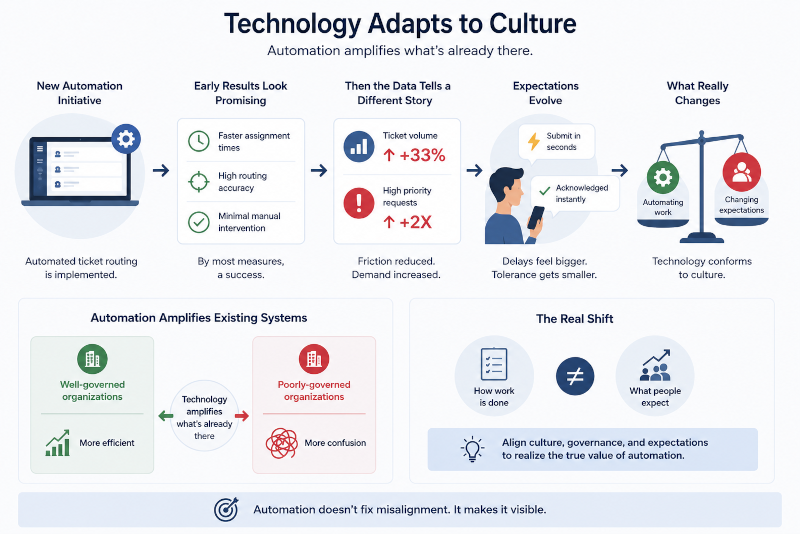
Then the data tells a different story. Ticket volume has increased significantly, and the number of High Priority requests has nearly doubled. The platform is not malfunctioning—it is doing exactly what it was designed to do. The organization has simply removed friction from a process that previously constrained demand.
This pattern appears across industries adopting AI-enabled workflows. Microsoft’s Work Trend Index continues to show that employees increasingly expect immediate responses and seamless digital experiences in the workplace. Once people become accustomed to submitting requests in seconds and receiving automated acknowledgments almost instantly, delays become far more noticeable. Waiting several days for a response suddenly feels unreasonable, even if the nature of the request has not changed.
Organizations often believe they are automating work when, in reality, they are changing expectations. This helps explain why many automation initiatives struggle to deliver their anticipated value. As discussed in Why Most AI Implementations Fail Inside Organizations, technology tends to amplify existing systems rather than replace them. Well-governed organizations become more efficient. Poorly governed organizations become more efficient at producing confusion.
Recommendation: Measure changes in ticket volume, escalation rates, and priority distributions after implementing automation—not just improvements in processing time.
The Cost of Constant Urgency
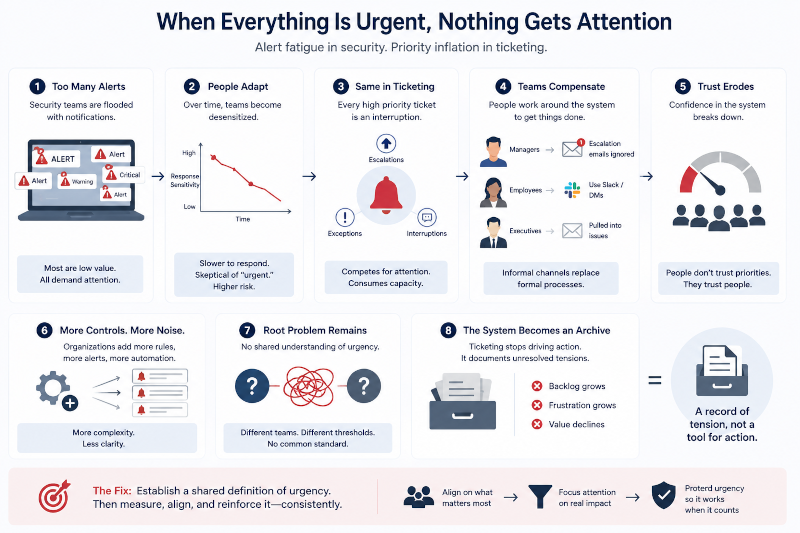
Cybersecurity professionals have spent years dealing with alert fatigue. Security teams are inundated with notifications every day, many of which ultimately prove to be inconsequential. Over time, people adapt. They become slower to respond, less sensitive to warnings, and increasingly skeptical of anything labeled “urgent.” PagerDuty identifies alert fatigue as a significant contributor to burnout and delayed response across digital operations environment.
Ticketing environments are not materially different. Every High Priority ticket represents an interruption. Every escalation competes for limited attention, and every exception consumes organizational capacity. Eventually, teams begin to compensate. Managers stop treating escalation emails with the same sense of urgency, employees turn to Slack or direct messages for visibility, and executives become increasingly involved in issues that should have remained within normal operational channels.
Once this behavior becomes common, confidence in the system begins to erode. Formal processes are gradually replaced by informal networks, not because employees prefer them, but because they no longer trust the ticketing system to accurately reflect business priorities.
Ironically, organizations often respond by introducing additional controls, more notifications, and increasingly sophisticated automation. Unfortunately, this typically produces more complexity rather than greater clarity. The underlying issue remains unchanged: the organization has never established a shared understanding of urgency.
At that point, ticketing systems stop functioning as operational tools and become something else entirely—a historical record of unresolved organizational tensions.
Recommendation: Measure how many escalated tickets ultimately require immediate action and use that data to recalibrate priority definitions.
A Real-World Reminder of What “Critical” Means
The CrowdStrike outage in July 2024 disrupted organizations around the world, affecting airlines, healthcare systems, financial institutions, and government agencies. During events of that scale, there is little debate about what constitutes a critical incident. Leaders must make difficult decisions, resources must be allocated carefully, and priorities become immediately apparent because the business impact is undeniable.
That reality stands in sharp contrast to many organizations that routinely classify access requests, minor application issues, and isolated user problems as High Priority. Over time, many enterprises lose the distinction between inconvenience and crisis. High-performing organizations work deliberately to preserve that distinction because they understand that one day they will face a truly critical event—and when they do, the ability to separate signal from noise becomes a significant operational advantage.
Recommendation: Conduct quarterly reviews of Critical tickets to ensure they align with actual business impact rather than perceived urgency.
Building a Framework That Scales
Organizations experiencing priority inflation are often tempted to respond with additional technology. A new workflow engine, more sophisticated automation rules, or AI-driven prioritization capabilities can seem like logical next steps. In practice, however, these investments rarely address the underlying issue because priority inflation is seldom a technology problem. More often, it is a governance problem that has finally become visible.
High-performing organizations approach prioritization with the understanding that it is a discipline rather than an administrative exercise. They establish clear criteria for determining impact and urgency, review how those criteria are applied over time, and monitor priority distributions as carefully as they monitor service levels or employee satisfaction metrics. In these environments, truly critical incidents remain relatively uncommon, escalations occur when circumstances warrant them, and priority classifications retain their meaning year after year.
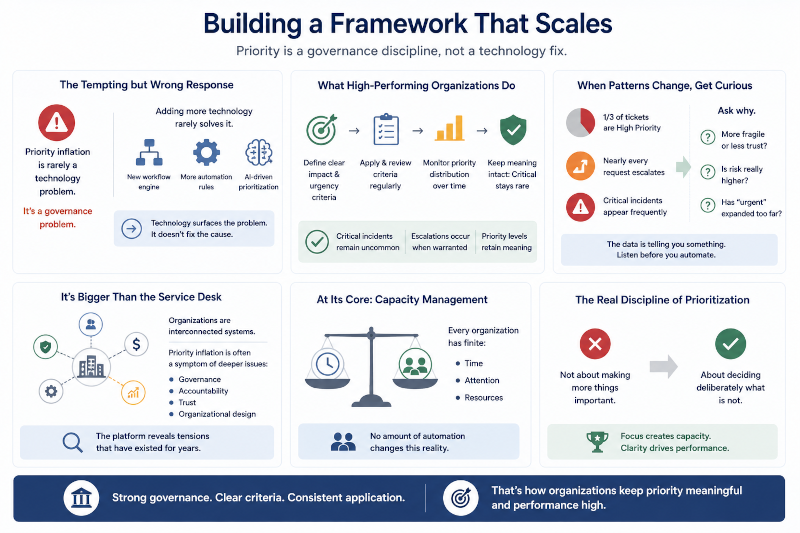
When those patterns begin to change, leaders should become curious. An organization where one-third of all tickets are categorized as High Priority is communicating something important. Likewise, environments where nearly every request requires escalation or where Critical incidents appear with surprising frequency should prompt a broader conversation. Is the organization becoming more fragile, or have teams simply lost confidence that lower-priority work will receive appropriate attention? Has business risk genuinely increased, or has the definition of urgency gradually expanded to encompass anything perceived as inconvenient?
These questions extend well beyond the service desk. As discussed in The New Skill Companies Actually Need: Systems Thinking, organizations function as interconnected systems, and operational issues rarely exist in isolation. Priority inflation is often the visible symptom of deeper challenges involving governance, accountability, trust, and organizational design. In many cases, the ticketing platform is merely surfacing tensions that have existed for years.
At its core, prioritization is an exercise in capacity management. Every organization operates with finite resources—limited time, limited attention, and a limited ability to respond to competing demands. No amount of automation changes that fundamental reality. The organizations that manage this well recognize that prioritization is not about making more things important. It is about making deliberate decisions about what is not.
Recommendation: Include priority distribution metrics in executive dashboards and review them quarterly alongside service levels, employee satisfaction, and broader operational performance indicators.
Conclusion
Ticket automation has undoubtedly delivered meaningful benefits across industries. Work moves more quickly, requests are easier to track, and leaders have greater visibility into where time, effort, and resources are being consumed across the enterprise. Service management platforms have become increasingly capable of identifying trends, reducing manual effort, and helping organizations operate at a scale that would have been difficult to imagine even a decade ago.
At the same time, many organizations have discovered that automation has a tendency to illuminate problems that were always present but easier to ignore. It does not create governance, establish accountability, or build consensus among leadership teams. Instead, it exposes the assumptions embedded within an organization—particularly around how decisions are made and what truly deserves immediate attention.
“Ticketing systems do not create organizational priorities—they reveal them.”
That is why an operational review showing that half of all tickets are classified as High Priority should not immediately prompt questions about the platform or the workflow. It should prompt a broader discussion among leadership. If everything is urgent, what does urgency actually mean? If every department believes its work deserves immediate attention, has the organization established a shared understanding of priority at all?
Ultimately, ticketing systems are more than repositories for work requests. They are reflections of organizational behavior. They reveal how leaders allocate attention, how teams navigate competing demands, and how effectively the enterprise distinguishes between inconvenience and genuine business risk. And, as with any mirror, the reflection is not always comfortable—but it is often instructive.
1 thought on “We Automated Ticketing… and Now Everything Is “High Priority””